
How Many Proposals to Get Your First Upwork Client?

By Luiz King · · Updated · 6 min read

There's no official number for how many proposals it takes to land your first Upwork client, and Upwork doesn't publish one. Freelancers on Upwork's own community forum report anything from getting hired in their first week to sending dozens of proposals first. What decides your number is your hit rate: how many proposals it takes to win one job. You can't control the market, but you can raise that rate.
Here's what a proposal costs, the math for your own number, and how to need fewer proposals.
Why is there no "normal" number?
Because two freelancers sending the same number of proposals can get very different results. Your number depends on:
- Your niche. A clear offer ("Shopify speed fixes") competes with fewer people than a vague one ("web developer").
- Your proof. A portfolio piece that matches the job beats a long list of skills.
- Which jobs you pick. Jobs that already have dozens of proposals are harder to win.
- How fast you apply. A job that's been open for days may already have a shortlist.
- The proposal itself. A message written for that client beats a template.
So when you read "it took me 70 proposals" on a forum, that tells you about that person's niche and proposals, not about yours. See the reports for yourself in this Upwork Community thread.
What does an Upwork proposal cost?
Sending a proposal costs Connects, Upwork's bidding credits. As of November 2026:
- Connects cost $0.15 each (Upwork).
- The number of Connects a proposal needs is set per job. Upwork says it depends on factors like project size, scope and market demand.
- When you get paid, Upwork takes a freelancer service fee of 0% to 15% per contract, fixed when the contract starts (Upwork).
Here's an example. If a job costs 10 Connects, that proposal costs $1.50. Send 40 proposals like that and you've spent $60 before your first job. That's not a reason to avoid Upwork. It's a reason to send fewer, better proposals instead of spraying every job.
How to work out your own number
Your number of proposals comes down to one question: out of every 10 proposals, how many turn into a job? That's your hit rate.
| Your hit rate | Proposals for 1 client | Proposals for 4 clients |
|---|---|---|
| 1 in 5 | 5 | 20 |
| 1 in 10 | 10 | 40 |
| 1 in 20 | 20 | 80 |
| 1 in 40 | 40 | 160 |
These rows are examples, not data. If you're brand new, you don't know your hit rate yet. Guess 1 in 20, track your real numbers for a few weeks, then update it.
To turn that into a timeline, put your numbers into our free money goal calculator. Enter your goal, what one job pays you, how many proposals it takes to win one, and how many you'll send a week. It tells you how many weeks that is and your daily target.
6 ways to need fewer proposals
- Pick a narrow offer. "I write product descriptions for skincare brands" is easier to say yes to than "I'm a writer".
- Make one sample that matches your offer. A real example of the exact thing the client needs does more than a list of skills.
- Open with their problem, not your bio. Clients often see only a preview of each proposal, so use your first lines to show you read the job.
- Answer the questions in the post. If the client asks something in the job post, answer it near the top.
- Apply to fewer, fresher jobs. Pick jobs that fit you well and were posted recently.
- Price sensibly, not cheaply. A rock-bottom price can make a client wonder why. Here's how much to charge as a beginner freelancer.
What to do when nobody replies
No replies after 20 or 30 proposals usually means one of three things. Check them in order:
| Symptom | Likely cause | Fix |
|---|---|---|
| Proposals aren't even viewed | Wrong jobs, or applying late | Apply to fewer, fresher jobs that fit your niche |
| Viewed, but no replies | Your opening doesn't hook | Rewrite the opening around the client's problem |
| Replies, but no hires | Your profile or samples don't build trust | Add one strong sample that matches the job |
Change one thing at a time, then send the next 10 proposals. That way you'll know what worked.
Make sending proposals a daily habit
The freelancers who get there aren't usually the ones who sent 50 proposals in one weekend. They're the ones who sent 5 a day for a month and kept improving them.
That's what Money Mode is built for. It's a free-to-start app for people making money online. You set a money goal, do one small task a day to keep your streak, and start a focus timer with one tap. It runs in your browser and installs on your phone like an app.
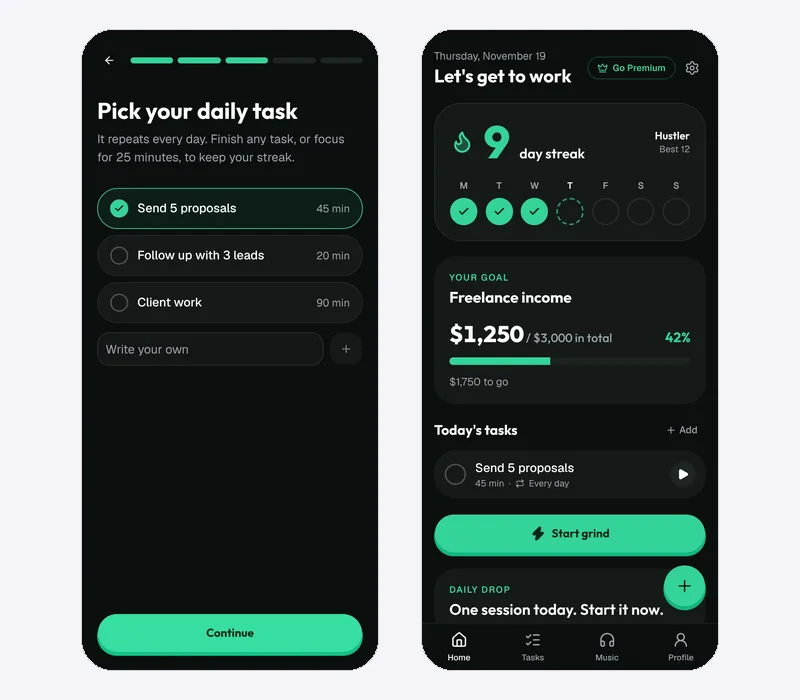
Its freelancing template starts you with a goal of $3,000 in total from clients and three daily tasks: send 5 proposals, follow up with 3 leads, and 90 minutes of client work. You can change all of them.
- Every task has a timer, so "send 5 proposals" can be a focused 45 minutes.
- A day counts as a grind day when you finish one task or focus for 25 minutes, so a week of "no" still shows a streak of real work.
- When the first payment lands, log it with + and watch your goal bar move.
You can set your first money goal free and start today's proposals with a timer running. For more on tracking freelance work, see the best habit trackers for freelancers.
FAQ
How many proposals should I send per day on Upwork?
There's no official number. A few well-matched proposals a day, like 3 to 5, is easier to keep up and to improve than a big batch once a week. Check how many Connects you'll spend first.
Why am I not getting any replies on Upwork?
Usually because the jobs don't fit your niche, you applied late, or your opening lines don't show you read the job. Fix one of those at a time and track the next 10 proposals.
How much does it cost to send a proposal on Upwork?
Each Connect costs $0.15, and each job sets how many Connects a proposal needs. Upwork also takes a 0% to 15% service fee on what you earn from a contract.
How long does it take to get your first client on Upwork?
It depends on your niche, proof and how many good proposals you send. Some freelancers report a job in their first week and others take months. Use your hit rate and weekly proposals to estimate your own timeline.
The short version
There's no magic number, only your hit rate. Pick a narrow offer, make one great sample, write openings about the client's problem, and send a few good proposals every day. Track your numbers, and the count you need will drop.

Luiz King
Builds Money Mode, a habit tracker and focus timer made for the money grind.