
To-Do List App With Timer: 5 Options Compared

By Luiz King · · 8 min read

A to-do list app with a timer lets you press start on a task and work against the clock, instead of keeping your list in one app and your timer in another. Blitzit is built around one task, one timer. Super Productivity is free and tracks time on every task. TickTick adds a Pomodoro timer to a full to-do list. Money Mode ties each timed task to a money goal and a daily streak. Todoist has no built-in timer at all.
One honest note first: we make Money Mode, so weigh our pick with that in mind. Every fact about the other apps comes from their own websites, help pages or App Store listing, checked in November 2026.
Why put the timer inside the to-do list?
Because the gap between "I have a list" and "I'm working on item one" is where most days go wrong.
With two separate apps, starting a task takes three decisions: pick the task, open the timer, set a length. Each one is a chance to open something else instead. When the timer lives on the task, starting is one tap, and the time you spend gets saved against that task.
That second part matters more than it sounds. A list tells you what you planned. A timer on each task tells you what you actually did.
The five options side by side
| Best for | Price (Nov 2026) | Timer | Watch out for | |
|---|---|---|---|---|
| Blitzit | One task at a time, always on screen | $6.99/month or $59.88/year, 7-day trial | Per-task estimate plus tracked time and overtime | Trial only, no free plan on its site |
| Super Productivity | Free, open source, lots of control | Free | Time tracking on each task, plus Pomodoro | More settings to learn |
| TickTick | A big to-do list with a focus timer added | Free plan. Premium: $49.99/year | Built-in "Pomo" timer | General-purpose, not built around a goal |
| Todoist | Pure task management | Free plan. Pro: $5/month billed yearly | None built in | You need a second app for timing |
| Money Mode | Timed tasks tied to an income goal | Free. Premium: $4.99/month or $29.99/year | Start button on every task, full-screen timer | Web app only, one goal at a time |
Blitzit: best if you want one task in front of you
Blitzit is built around the idea of doing one task at a time with a timer that stays visible while you work. You estimate how long a task should take, and Blitzit tracks the time you actually spend, including overtime. It also has a Pomodoro mode with work sprints and breaks you can set yourself.
Its site lists $6.99 a month, or $59.88 a year (which works out to $4.99 a month), with a 7-day trial and a 30-day money-back guarantee. It connects to tools like Notion, ClickUp and Google Calendar. Its mobile app is marked as a beta.
Pick it if you already plan tasks somewhere else and want a focused timer layer on top. Skip it if you want a free option.
Super Productivity: best free option
Super Productivity is free and open source (MIT licence), with no trial and no paid tier. It runs on Windows, macOS, Linux, Android, iOS and the web. You start a task and it tracks your time on it, and it has a focus mode with a Pomodoro timer and breaks.
Sync between devices is optional, through its own Super Sync, WebDAV or Dropbox. It also connects to GitHub, GitLab and Jira, which suits developers.
Pick it if you want a capable timer and list without paying. Skip it if you want something with almost no setup.
TickTick: best if you want everything in one app
TickTick is a full to-do list with calendars, habits and a built-in Pomodoro timer it calls the "Pomo Timer". The app is free to download, and its upgrade page lists Premium at US$49.99 a year. The App Store also lists a $4.99 monthly plan. It runs on phones, computers, tablets, watches and the web.
We compare TickTick as a habit tracker in our post on the best habit tracker for freelancers.
Pick it if you have lots of projects and want one inbox for them. Skip it if you want your timer connected to an income target, because that's something you'd have to set up yourself.
Todoist: great list, no timer
Todoist is one of the best-known to-do apps, but it has no timer of its own. Its own Pomodoro guide tells you to set a timer separately and suggests apps that connect to Todoist, such as Toggl Track. Pro costs $5 a month billed yearly, or $7 billed monthly.
Pick it if your list is the main thing and you're happy using a second app for timing. Skip it if the whole point is one tap from task to timer.
Money Mode: best if your tasks are about making money
Money Mode is a habit tracker and focus timer made for the money grind. You set one money goal, like "$3,000 from freelance clients", then add the daily tasks that move you toward it. Every task has a ▶ button.
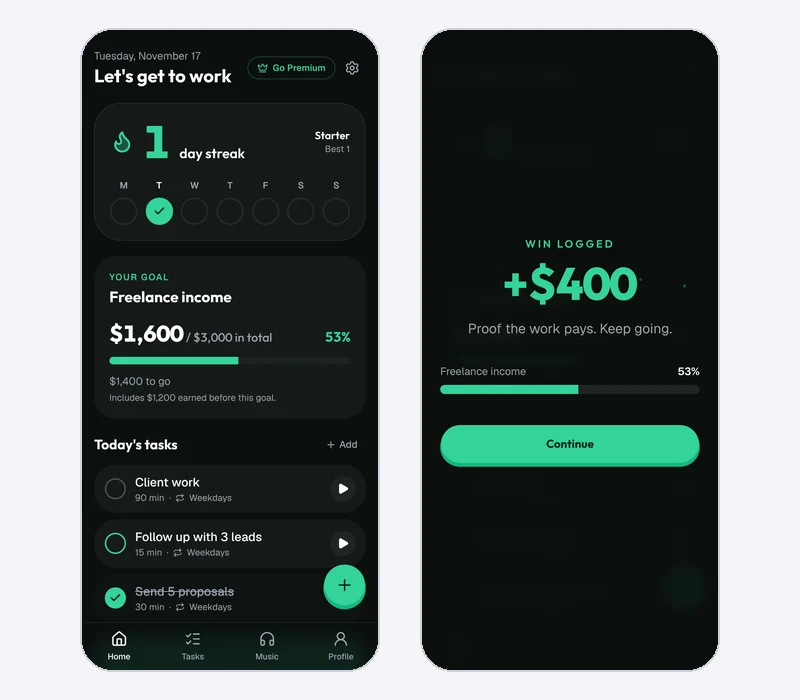
How a timed task works
- Press ▶ on a task. A short "Start focus" dialog shows the task's planned length. You can change it for this one session.
- Work in a full-screen timer. Quick lengths are 15, 30, 45, 60 and 90 minutes, or a custom length. You can pause, stop, or mark the task done early.
- Leave the screen if you need to. A floating bar shows the task and the time left on every screen, and takes you back to the timer.
- When time is up, mark the task done, add 5 or 15 minutes, or stop.
- Stopping isn't failing. If you stop early, your minutes are saved and the task stays open in today's list.
Not on your list? Type into the "What are you working on?" box on the Tasks screen and a timer starts straight away.
Why the timer is tied to a streak
Every focus minute counts toward your day. A day counts as a grind day when you finish at least one task or focus for 25 minutes. So even a day where you only got one session in still keeps your streak alive.
Music and motivation are optional. There's a Lo-fi station on its own Music tab, and a short motivational line at the start of a session that you can switch off in Settings. Neither is part of starting a timer, so starting stays one decision.
You can set your first money goal and start a timed task free.
Where Money Mode is limited
- One goal at a time. It's built for people working toward one income target, not for managing ten projects.
- Free keeps three open tasks at once. Timers and check-offs are unlimited, but a fourth open task needs Premium.
- No automatic Pomodoro breaks. The timer runs one block per task. If you want 25/5 cycles, Blitzit, Super Productivity and TickTick do that today.
- No integrations. It doesn't connect to Notion, Jira or your calendar.
- It's a web app you install. It works offline, but there's no native iPhone or Android app yet.
- Free stores data in your browser only. Cloud sync across devices is Premium.
Premium costs $4.99 a month, $29.99 a year or $99 once, with a 14-day free trial on monthly and annual plans. See the pricing page for current prices.
How to choose in 60 seconds
- You want free and flexible: Super Productivity.
- You want one task and one timer, always on screen: Blitzit.
- You want a big to-do list with a Pomodoro timer inside: TickTick.
- You love your list and don't mind a second app for timing: Todoist plus a timer app.
- You want every timed task to move a money goal and a streak: Money Mode.
Does a timer actually help you focus?
Somewhat, and the research is more modest than productivity blogs claim. A 2023 study of 87 university students found that taking a short break on a fixed schedule (6 minutes after every 24) left students less tired and less distracted than taking breaks whenever they felt like it, and they got the same work done in less time (Biwer et al., 2023).
But a timer doesn't fix a vague task or a phone next to your keyboard. If your timer keeps going off and you still drift, read why Pomodoro isn't working for you.
FAQ
Is there a free to-do list app with a timer?
Yes. Super Productivity is completely free and open source. Money Mode's free plan includes its timer, and TickTick has a free plan too.
Does Todoist have a built-in timer?
No. Todoist's own help guide suggests setting a timer separately or connecting a time-tracking app such as Toggl Track.
What's the difference between a task timer and a time tracker?
A task timer counts down a block of focus time so you start and stop on purpose. A time tracker records how long you spent, often for billing a client. Some apps, like Blitzit and Super Productivity, do both.
Can I use a to-do list timer app on my phone and computer?
Most of these work on both. Super Productivity lists desktop, mobile and web. TickTick runs on phones, computers and the web. Money Mode is a web app you can install on both, and syncing between devices is a Premium feature.
The short version
If all you want is a timer on each task, start with Super Productivity because it's free. If you want one task glowing on screen, try Blitzit. If you want your timed work to add up to a money goal and a streak you don't want to break, that's what we built Money Mode for. Try it free and see if pressing ▶ on today's first task gets easier.

Luiz King
Builds Money Mode, a habit tracker and focus timer made for the money grind.