
Best Revenue Tracker for Solo Founders: 5 Options Compared

By Luiz King · · 7 min read

The best revenue tracker for a solo founder depends on which of two jobs you need done. Bookkeeping (taxes, invoices, expenses) is what Wave, QuickBooks and FreshBooks do. Momentum (one revenue number you check every day and push toward) is what a spreadsheet or Money Mode does. Past $10k a month, you probably need one of each. Trouble starts when you ask one tool to do both.
This post compares five options on price, setup time and what each one is really for. One honest note first: we make Money Mode, so weigh our pick with that in mind. Every fact about the other tools comes from their own pricing pages, checked on November 24, 2026.
What should a revenue tracker do for a solo founder?
A solo founder's revenue is lumpy. An agency owner might get a $24,000 retainer payment one week and nothing the next. A freelancer might close three projects in a month, then none. So a useful tracker has to answer three questions fast:
- Where am I against my number? Not "what came in today", but "how far from this year's target am I, and am I on pace?"
- Where does the money come from? If 70% comes from retainers, losing one client is a real risk. You want to see that split without building a pivot table.
- Is it honest about taxes and costs? Revenue isn't profit. For taxes, you need real books.
No single tool does all three well. That's the main thing to understand before you pick.
The five options side by side
| Main job | Price (Nov 24, 2026) | Setup | Watch out for | |
|---|---|---|---|---|
| Spreadsheet | Anything you build | Free | An afternoon | Only as good as your discipline |
| Wave | Invoices and bookkeeping | Starter $0. Pro $19/month or $190/year | An hour | Bank import is Pro only |
| QuickBooks | Full accounting | Free plan. Lite $20/month list price | An hour or more | Promo prices change often |
| FreshBooks | Invoicing service businesses | Lite $23/month list price | An hour | Lite caps you at 5 billable clients |
| Money Mode | One revenue goal plus daily habits | Free. Premium $4.99/month, $29.99/year or $99 once | 2 minutes | Manual logging, no bank sync, not accounting |
A spreadsheet: free, flexible and easy to abandon
A Google Sheet with three columns (date, amount, source) is a real revenue tracker. Add a SUMIFS per month and a chart, and you have more than most people need.
It works for founders who already open a sheet every day. It fails for everyone else, because nothing pulls you back to it. It's easy to build a beautiful revenue dashboard in January and stop updating it by March.
Pick it if you like building your own systems. Skip it if you've already started and abandoned one.
Wave: the free bookkeeping option
Wave's pricing page lists a free Starter plan with unlimited estimates, invoices, bills and bookkeeping records. Pro costs $19 a month or $190 a year and adds automatic bank imports. Card payments through Wave cost 2.9% + $0.60 per transaction.
Pick it if you send invoices and want real books without a monthly fee. Skip it if you want bank transactions pulled in automatically but don't want to pay for Pro.
QuickBooks: full accounting, more than most solo founders need
QuickBooks' solopreneur page lists a Free plan, Lite at $20 a month and Simple Start at $38 a month (list prices, before a Black Friday discount that ends November 29, 2026). It connects to your bank and card accounts and syncs transactions automatically.
Pick it if you have an accountant who already uses QuickBooks, or your books are getting complicated. Skip it if you just want to see your revenue number, because you'll spend more time categorizing than looking.
FreshBooks: built for invoicing clients
FreshBooks' pricing page lists Lite at $23 a month (list price, with a big promo running as of November 24, 2026). Lite lets you send invoices to 5 billable clients, and there's no free plan.
Pick it if you run a service business and invoicing is most of your admin. Skip it if you have more than five clients and don't want to jump to a higher tier.
Money Mode: one revenue goal, tracked daily
Money Mode is an app for people making money online. You set one money goal, like "$250,000 agency revenue in 2026", log each payment in two taps, and add the daily tasks that bring the money in. It runs in your browser and installs on your phone like an app.
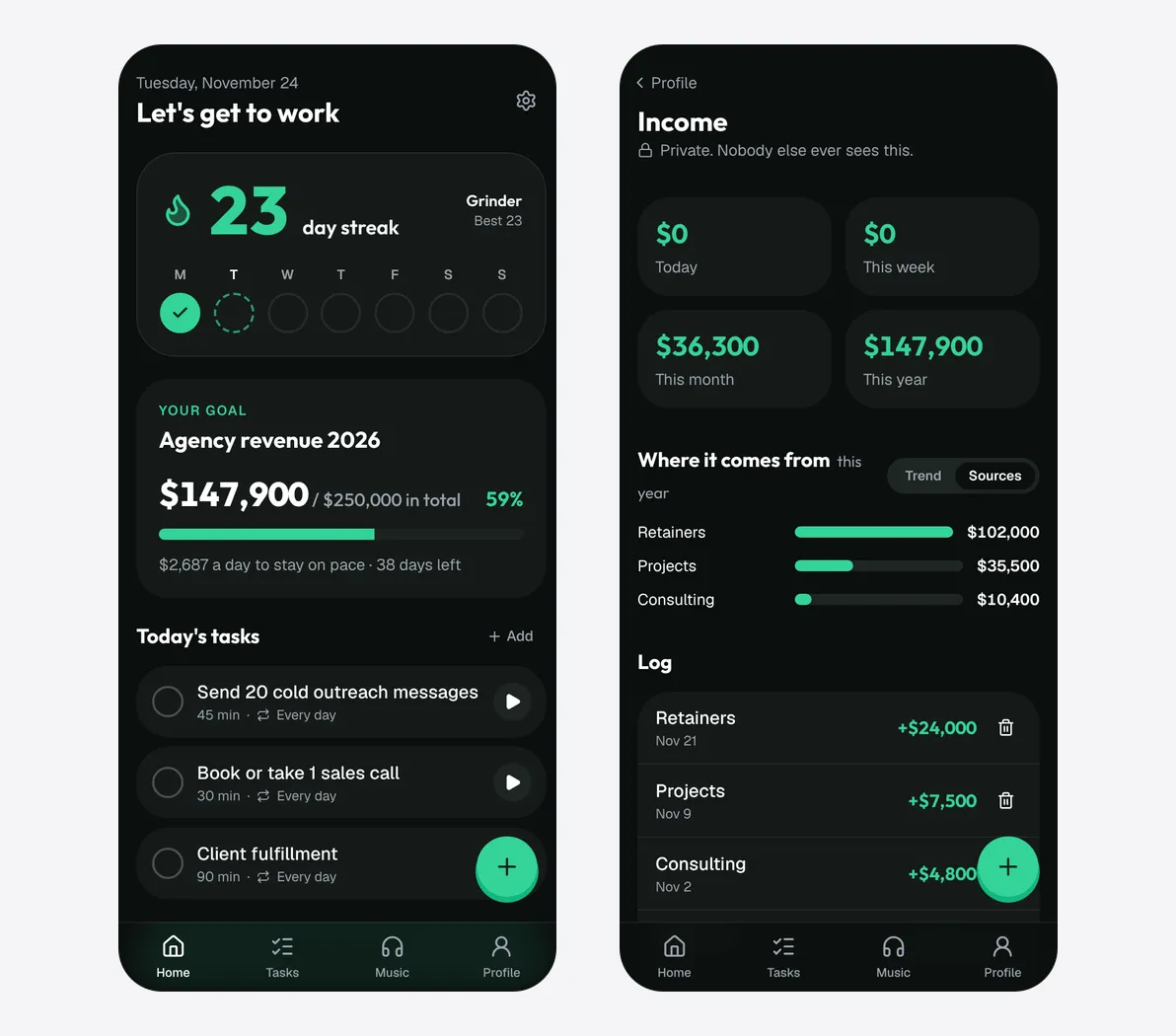
Here's what it does that the others don't:
- It tells you the daily pace. The goal card says how much a day you need to stay on track ("$2,687 a day to stay on pace, 38 days left" in the example above). That turns a big yearly number into a daily one.
- It shows where money comes from. Tag each payment with a source like "Retainers" or "Upwork". The Sources view splits your revenue by tag, so client concentration is obvious.
- It ties revenue to daily work. Your daily tasks (for example "send 20 cold outreach messages") sit under the goal. Finishing one keeps your streak alive.
And here's what it doesn't do: no bank or Stripe connection, no invoices, no expenses, no taxes. You type each payment in yourself. That's a feature if you want to feel each win, and a dealbreaker if you want zero manual work.
Free vs Premium
The free plan covers the core loop: your goal, the income log and 3 open tasks. Your data stays in that browser. Premium adds cloud sync across devices, full history and unlimited tasks, for $4.99 a month, $29.99 a year or $99 once. There's a 14-day free trial. (Try Money Mode free for 14 days.)
Which revenue tracker should you pick?
Find the line that sounds most like you:
| If you... | Use |
|---|---|
| Have no books yet and invoice clients | Wave Starter (free) |
| Have an accountant or messy books | QuickBooks |
| Bill 5 or fewer clients and hate admin | FreshBooks Lite |
| Love spreadsheets and open one daily | A Google Sheet |
| Have books but your revenue goal feels abstract | Money Mode, next to your bookkeeping tool |
| Bill only subscriptions through Stripe | An MRR tracker instead (see our MRR tracker comparison) |
A 10-minute weekly revenue review you can copy
Whatever tool you pick, a tracker only helps if you look at it. Put this on your calendar for Friday afternoon:
- Log every payment from the week (2 minutes). Tag the source.
- Check pace (1 minute). Are you ahead or behind the daily pace to your goal?
- Check concentration (2 minutes). Does any one client or channel bring in more than half? If yes, write one action to add a second source.
- Pick next week's input (5 minutes). Revenue is a result. Decide the one daily action that drives it, like 20 outreach messages or 2 sales calls, and make it a recurring task.
FAQ
What is the best free revenue tracker?
For bookkeeping, Wave Starter is free and includes unlimited invoices and records. For a simple goal-and-progress view, a Google Sheet or Money Mode's free plan both cost nothing.
What's the difference between revenue and profit tracking?
Revenue is all the money that comes in. Profit is what's left after costs. Accounting tools like Wave and QuickBooks track both. Goal trackers like Money Mode only track money earned, so use them next to your books, not instead of them.
Should I track revenue daily or monthly?
Look at your goal daily and do the full review weekly. Monthly is too slow: by the time you see a bad month, it's over.
Do I need a separate tracker if I use Stripe?
If all your revenue is subscriptions billed through Stripe, the Stripe Dashboard already shows MRR (monthly recurring revenue) and churn. Read MRR vs total revenue goals to decide which number to chase.
The short version
Use bookkeeping software for taxes, because you have to. Use a goal tracker for momentum, because you want to. If your revenue number feels abstract and you check your books once a month, Money Mode gives you one goal, a daily pace and a streak for the work that moves it.

Luiz King
Builds Money Mode, a habit tracker and focus timer made for the money grind.