
Best MRR Tracker for Solo Founders: 5 Tools Compared

By Luiz King · · 7 min read

The best MRR tracker for most solo founders is a free one: the Stripe Dashboard if you bill through Stripe, or ProfitWell Metrics if you want more detail at no cost. ChartMogul is free until $10K MRR, then paid. Baremetrics is paid from day one. Money Mode does a different job: it doesn't connect to Stripe, it turns your MRR into a goal with daily tasks.
MRR means monthly recurring revenue: the subscription income you can count on every month. This post compares the five options on price, caps and what each is for. We make Money Mode, so weigh our pick with that in mind. Facts about the other tools come from their own sites, checked on November 24, 2026.
Do you need an MRR tracker at all?
If you bill subscriptions through Stripe, you already have one. Stripe's Billing analytics docs list MRR, MRR growth, churn rate, ARPU (average revenue per user), lifetime value, trial conversion and cohort retention, right in the Dashboard.
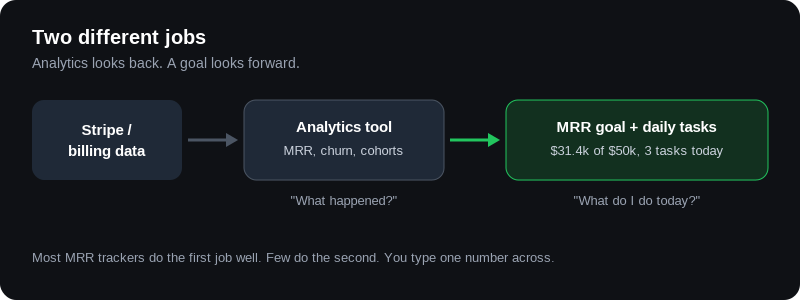
So the real question isn't "how do I see my MRR?" It's one of these:
- I want deeper analytics (segments, forecasts, investor reports). You need an analytics tool.
- I bill through more than one system (Stripe plus App Store, say). You need a tool that merges them.
- I see the number but it doesn't change what I do today. You need a goal, not another chart.
The five MRR trackers side by side
| Best for | Price (Nov 24, 2026) | Connects to billing? | Watch out for | |
|---|---|---|---|---|
| Stripe Dashboard | Founders already on Stripe Billing | Comes with Stripe Billing (see Stripe's pricing) | Built in | Only sees Stripe revenue |
| ProfitWell Metrics | Free, detailed metrics | Free | Yes: Stripe, Chargebee, Braintree, Recurly, Zuora | Owned by Paddle, which sells paid add-ons |
| ChartMogul | Growing SaaS that will want more later | Free up to $10K MRR; paid plans scale with ARR | Yes | Price jumps once you pass $10K MRR |
| Baremetrics | Founders who want polished dashboards | Launch listed at $75/month; no free plan | Yes | Paid from day one (free trial only) |
| Money Mode | Turning MRR into a goal and daily habits | Free. Premium $4.99/month, $29.99/year or $99 once | No, you type in your MRR | Not analytics: no churn, cohorts or segments |
Stripe Dashboard: you probably already have it
If all your subscriptions run through Stripe Billing, open the Billing overview in your Dashboard before you sign up for anything. It covers the metrics most solo founders check: MRR, new subscribers, churn and trial conversion. Stripe also offers CSV reports such as "MRR per subscriber per month".
Pick it if Stripe is your only billing system. Skip it if you also sell through the App Store, Gumroad or another platform, because Stripe only sees Stripe.
ProfitWell Metrics: free and surprisingly deep
ProfitWell Metrics is owned by Paddle and describes itself as revenue reporting for subscription companies that is "completely free". It connects in one click to Stripe, Chargebee, Braintree, Recurly, Zuora and Paddle itself. Its page shows no MRR cap.
Pick it if you want more than Stripe's built-in view and don't want to pay. Skip it if you want a polished product focused only on analytics, since Paddle's business is selling payments and retention tools. (Disclosure: Money Mode also uses Paddle for payments.)
ChartMogul: free until you're doing well
ChartMogul's pricing page says the Free plan covers you "up to $10K MRR", which is $120K ARR (annual recurring revenue). Paid plans (Starter, Pro and Enterprise) are priced on a slider by ARR, so the cost grows with your revenue. Free and Starter connect one billing system; Pro connects up to five.
Pick it if you're under $10K MRR and want a tool you won't outgrow. Skip it if you're well past $10K MRR and only need basic numbers, because you'll be paying for depth you don't use.
Baremetrics: polished, paid from the start
Baremetrics' pricing page lists Launch at $75 a month for $0 to $360K ARR, Growth at $255 a month and Scale at $1,152 a month. The FAQ on the same page gives lower "starts at" prices ($49, $189 and $749), so check the live page before you buy. Annual plans come with up to 35% off. There's a free trial, but no free plan.
Pick it if you want clean dashboards and add-ons like failed-payment recovery. Skip it if you're early and a free tool shows the same MRR number.
Money Mode: the number becomes a goal
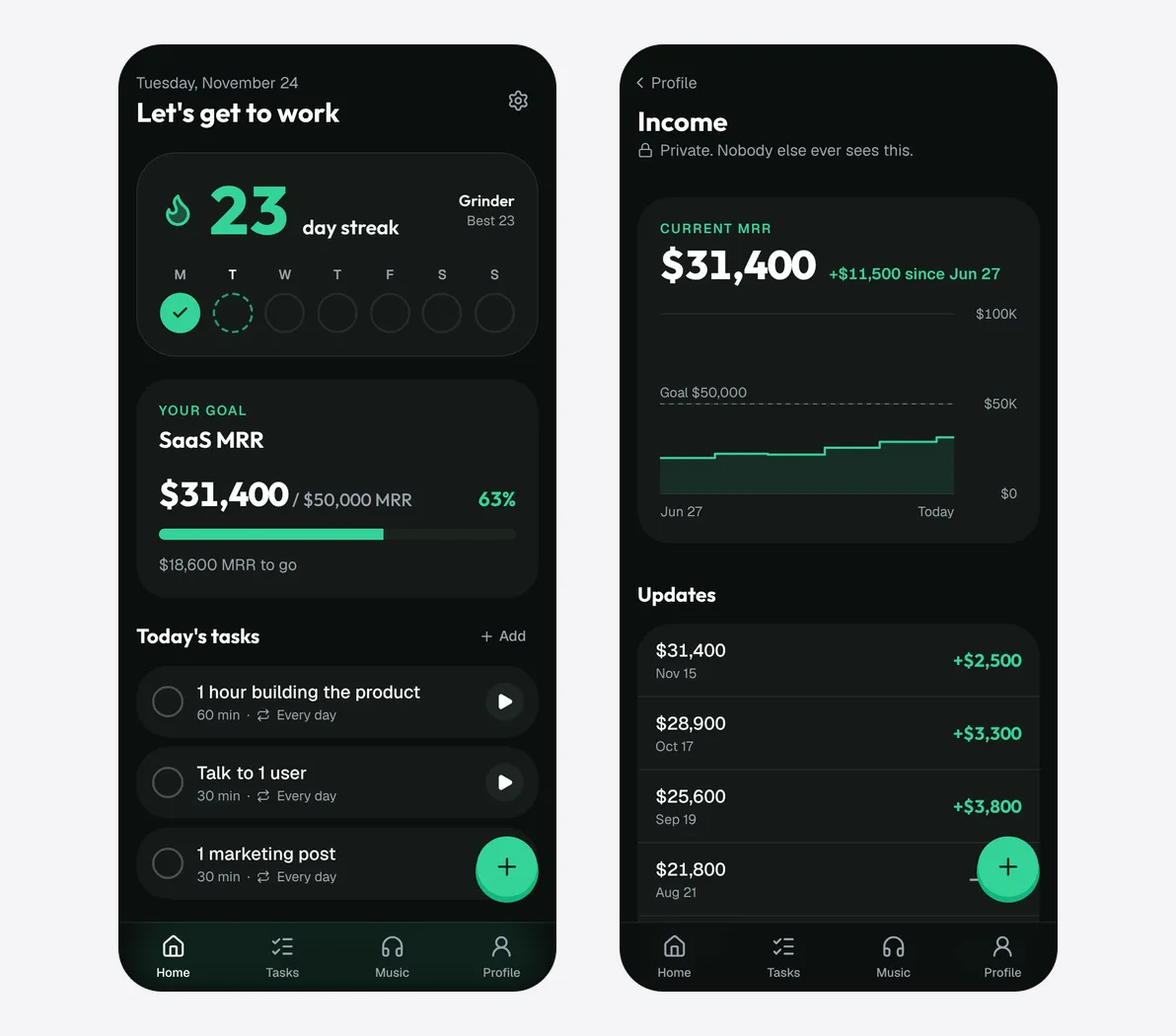
Money Mode is an app for people making money online. You set one money goal (here, an MRR target like "$50,000 MRR"), update your current MRR when it changes, and add the daily tasks that grow it. It runs in your browser and installs on your phone like an app.
What it adds that analytics tools don't:
- A target and a gap. "$18,600 MRR to go" sits on your home screen every morning.
- Daily inputs under the goal. The SaaS starter tasks are "1 hour building the product", "talk to 1 user" and "1 marketing post". You can edit them.
- A streak for the work. Finishing one task (or 25 focus minutes) counts as a grind day.
- MRR history as steps. MRR holds steady between updates, so the chart shows steps, not fake slopes, and keeps every update you've made.
What it doesn't do: no Stripe connection, no churn, no cohorts. You type your MRR in when it changes. A good habit is to copy it from Stripe or ProfitWell once a week.
Free covers the goal, MRR updates and 3 open tasks, with data kept in your browser. Premium adds cloud sync, full history and unlimited tasks, with a 14-day free trial. (Try Money Mode free for 14 days.)
The setup I'd use as a solo founder
- Metrics: Stripe Dashboard. Add ProfitWell Metrics (free) if you need more. Add ChartMogul or Baremetrics only when a specific question needs them, like an investor asking for cohort data.
- Goal: pick your next MRR milestone (for example, $10K to $25K) and put it in Money Mode with your current MRR.
- Weekly: every Monday, copy MRR from Stripe into Money Mode. Takes 30 seconds.
- Daily: do one task that moves MRR, like talking to one user, before you open the dashboard.
FAQ
What is the best free MRR tracker?
The Stripe Dashboard if you bill only through Stripe. ProfitWell Metrics if you want deeper free analytics across Stripe, Chargebee, Braintree, Recurly or Zuora. ChartMogul is free until $10K MRR.
Is ChartMogul or Baremetrics better for a solo founder?
Under $10K MRR, ChartMogul's free plan wins on price. Baremetrics has no free plan, with Launch listed at $75 a month. Above that, compare the dashboards you'd actually use.
Can I track MRR without Stripe?
Yes. A spreadsheet works, and Money Mode lets you type in your MRR whenever it changes and shows it as a step chart against your goal. Neither needs a billing connection.
Should my goal be MRR or total revenue?
MRR if most of your money is subscriptions or retainers. Total revenue if it comes from one-off sales or projects. Our guide to MRR vs total revenue goals walks through both, and if you're not on subscriptions, see the revenue tracker comparison instead.
The short version
Use a free analytics tool to see your MRR. Use a goal to change it. If the number on your dashboard isn't changing what you do each morning, put it in Money Mode with a target and the three tasks that move it.

Luiz King
Builds Money Mode, a habit tracker and focus timer made for the money grind.