
How to Stop Checking Your Phone While Working

By Luiz King · · 7 min read
To stop checking your phone while working, don't rely on willpower. Make checking harder than working: silence it with a focus mode, put it out of reach, and give yourself one clear task with a timer, so there's always a next step that isn't your phone. Then check it on purpose, between blocks, instead of every few minutes.
Here's why the urge is so strong, a five-step setup that removes most of it, and a routine you can copy tonight.
Why do you keep checking your phone?
Because checking is easy and your task is hard. When the work gets unclear or boring, your brain looks for a quick reward, and the phone is always the closest one.
It's not only notifications. Gloria Mark, a professor at UC Irvine who has studied attention at work for over 20 years, says people now stay on one screen for about 47 seconds on average, and that about half the time we interrupt ourselves (UC Newsroom). Nobody pinged you. You just reached for it.
That's why "I'll just be stronger" doesn't work. The fix is to change the setup, not your personality.
What does a quick check really cost?
More than the 30 seconds it takes. When you switch away from a task and come back, part of your mind is still on the other thing. Researcher Sophie Leroy called this attention residue: in her experiments, people who still had another task on their mind did worse on the next one (Leroy, 2009).
So a "quick" look at a message doesn't just cost the look. It costs the next few minutes of thinking, while your head catches up.
Does the phone need to be in another room?
You'll often read that just having your phone nearby makes you dumber, even when it's off. That claim comes from a well-known 2017 study (Ward et al.). But when other researchers repeated it carefully, they didn't find the same effect (Ruiz Pardo & Minda, 2022).
So here's the honest version: a silent phone on your desk probably isn't draining your brain. Reaching for it is the problem. Putting it in another room still helps, but for a simpler reason. It adds a few seconds of effort, and that's often enough to make you stop and ask, "Do I actually need this?"
A 5-step setup that removes the urge
Do this once, then reuse it every session.
- Turn on a focus mode. On iPhone, set up a Focus that lets only the people and apps you choose notify you (Apple). On Android, Digital Wellbeing's Focus mode pauses the apps you pick, so they can't send notifications or open (Google).
- Put the phone out of reach. Another room is best. A drawer or a bag across the room works too. Face down within arm's reach doesn't count.
- Write one task with a finish line. "Work on my channel" invites checking. "Edit the first 3 minutes of Tuesday's video" doesn't, because you always know what's next.
- Start a timer for that task. A timer turns "work until I feel done" into a block with an end. It's much easier to ignore the phone when you know you're allowed to check it in 45 minutes.
- Plan the check. Check messages between blocks, on purpose, for a set few minutes. Then the urge in the middle of a block has an answer: "Not now, at the break."
Don't spend your break scrolling, though. In one study, people who spent their break on a phone did worse afterwards than people who did the same break task on paper or a computer. Here's why a phone break can ruin the next block.
What if you need your phone for work?
Plenty of hustles live on the phone: client DMs, TikTok, a store app. You can't hide it all day. So split your phone time into two kinds:
| Phone time | When | Example |
|---|---|---|
| Work batch | A planned block with one job | "Reply to all client DMs, 20 min" |
| Free time | Between blocks, after work | Scroll, chat, whatever you like |
| Off-limits | During a focus block | Nothing. It's in the drawer. |
The trick is that every phone session has a name and a time. "Reply to client DMs" is a task. "Just check something" isn't.
If your work is outreach, like cold DMs for an agency, put it in one timed batch instead of sending a few every hour. Here's a realistic daily plan for cold DMs.
A focus routine you can copy tonight
This fits after a day job, in about 1 hour 15 minutes.
| Time | What you do | Phone |
|---|---|---|
| 0:00 | Write tonight's one task on paper | Focus mode on, phone in a drawer |
| 0:02 | Start a 45-minute timer and work | Drawer |
| 0:47 | Break: stand up, water, stretch | Still in the drawer |
| 0:52 | Planned check: 5 minutes of messages | Out, on purpose |
| 0:57 | Second block: 20 minutes, or stop for the night | Back in the drawer |
Is 45 minutes too long for you right now? Start with 25 and build up. Here's how long a deep work session should be for your level.
How Money Mode makes the timer the easy choice
Money Mode is a free-to-start app for people making money online. You set a money goal, do one small task a day to keep your streak, and start a focus timer with one tap. It runs in your browser and installs on your phone like an app.
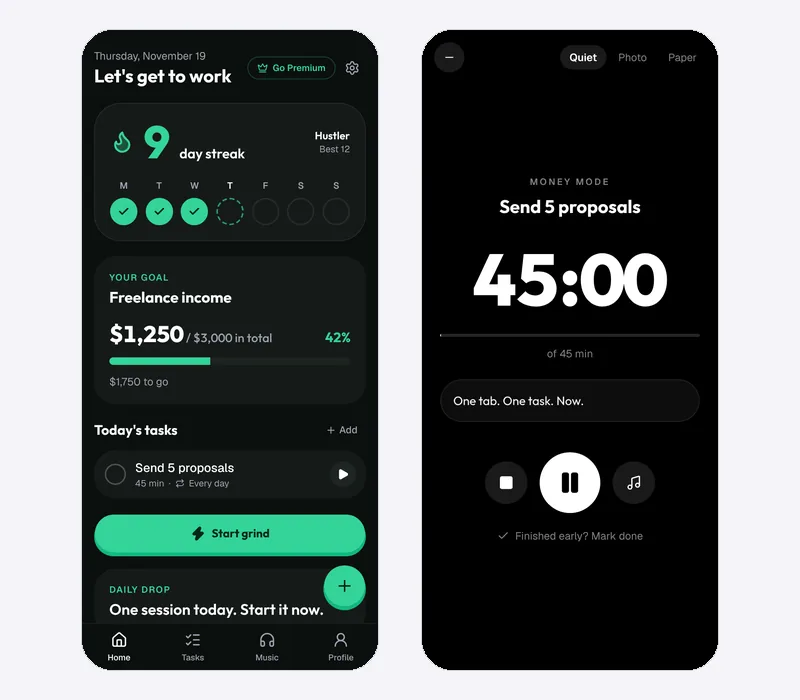
It covers steps 3 and 4 of the setup:
- Every task has its length built in, like "Edit 3 minutes of video, 45 min". Press ▶ and the full-screen timer starts. No setup to fiddle with when you're tired.
- Focus minutes count. Focus for 25 minutes or finish one task and the day counts as a grind day, which keeps your streak alive.
- Stopping early still saves your minutes, and the task stays open for tomorrow, so one bad session doesn't wipe the day.
One honest note: Money Mode doesn't block other apps. Use your phone's focus mode for that, and let Money Mode give you the one task and the timer. If you run it on the same phone, start the timer, turn the screen off, and put the phone away. The timer keeps counting.
The free plan includes the timer and up to three open tasks. You can start your first focus session free in about two minutes.
FAQ
Why do I keep checking my phone for no reason?
Usually because the task in front of you is unclear or boring, and the phone is the fastest reward nearby. Researcher Gloria Mark found about half of our interruptions are self-interruptions, not notifications. A clear next step and a timer remove most of the reason to reach.
Does putting your phone in another room help you focus?
Yes, mainly because it makes checking take effort. A famous 2017 study said a phone's mere presence reduces brainpower, but later replications didn't find that effect. The distance works because you have to stand up to check.
How often should I check my phone while working?
Pick fixed times instead of checking whenever you feel like it, for example once between each 45-minute block. If clients need you, tell them when you reply, like "within two hours", and batch your replies.
What's the best app to stop checking your phone?
Start with the one you already have: Focus on iPhone or Focus mode in Android's Digital Wellbeing. Both silence or pause the apps you choose. Add a timer app for the work itself, so you also know what to do instead.
The short version
Willpower loses to a phone that's within reach. Turn on a focus mode, put the phone out of reach, write one task with a finish line, and start a timer. Then check on purpose between blocks. Fewer checks means fewer restarts, and that's where the real time goes.

Luiz King
Builds Money Mode, a habit tracker and focus timer made for the money grind.